Email: info@nocodepakistan,com
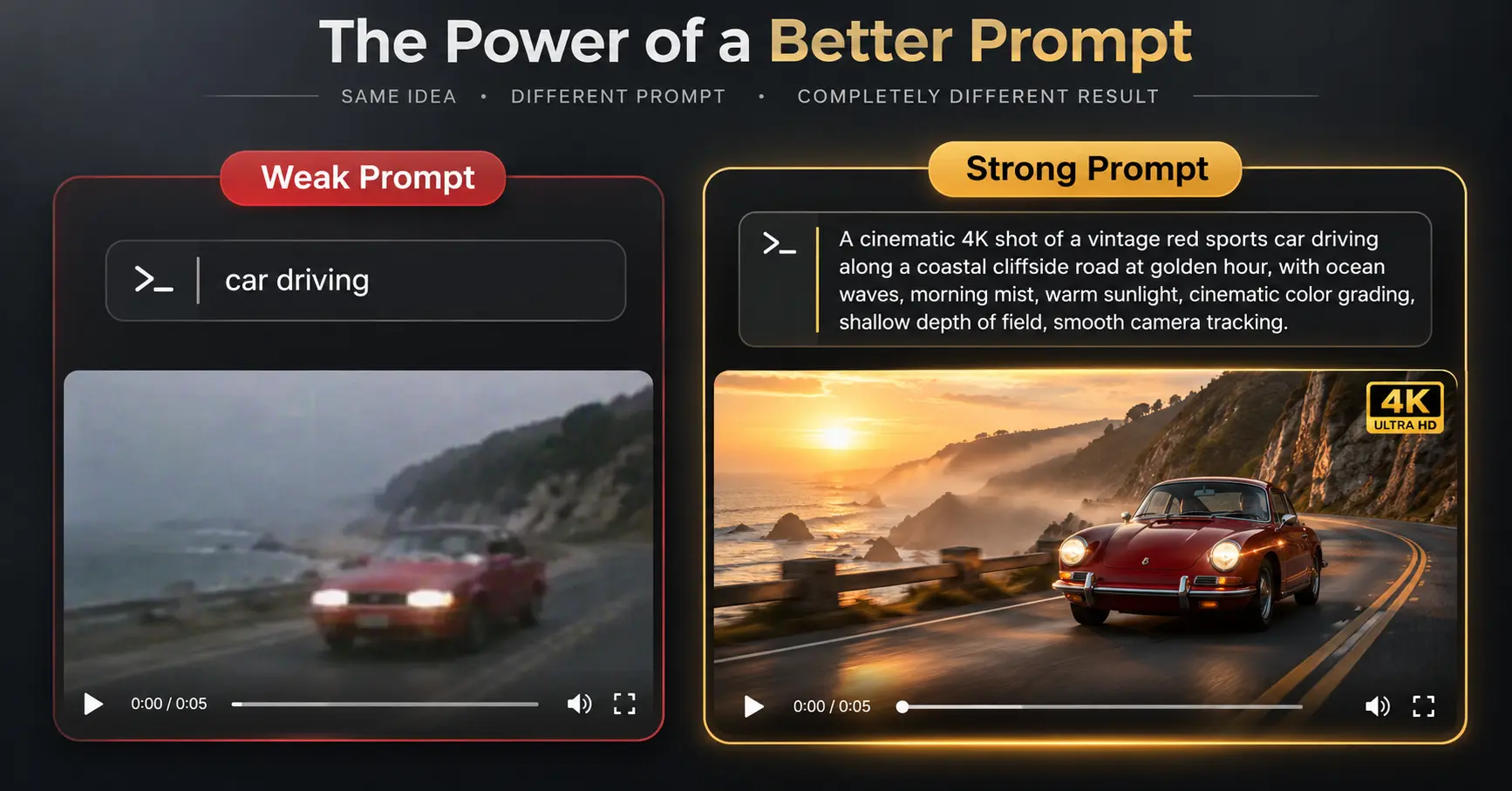

Learning how to write AI video prompts is the single biggest difference between generating blurry, morphing clips and producing smooth, cinematic scenes that look shot on a real film set. Most beginners type five vague words into a video generator, hit render, and blame the tool when characters grow extra fingers or backgrounds melt into noise. Once you understand how video models read motion, camera direction, and lighting cues, you can control every frame with precision.
In this complete guide, you will discover why generic descriptions fall flat, master an easy 8-step framework for how to write AI video prompts, and study 25 copy-and-paste before-and-after transformations across multiple genres. You will also learn how to adapt your descriptions for image-to-video workflows and when to choose short versus detailed instructions.
Table of Contents
Skip the Trial and Error With 500 Ready-to-Use Video Templates Stop wasting generation credits on distorted clips and awkward camera jumps. Our 500 Customisable AI Video Prompts bundle gives you plug-and-play story-to-video and image-to-video frameworks with built-in character consistency and cinematic workflows. Get the 500 Customisable AI Video Prompts Bundle on Etsy
Why Most AI Video Prompts Fail
When people first try text-to-video tools, they treat the prompt box like a search engine. Typing “a dog running in a park” forces the AI model to guess the breed of the dog, the speed of the run, the time of day, the lens focal length, and how the camera moves. Because the model has to fill in dozens of missing visual decisions on its own, the output looks generic or unstable.
First, vague prompts lack clear motion verbs. Still image generators only need to describe how a scene looks in a single frozen instant, whereas video models must calculate how subjects and backgrounds change across twenty-four frames per second. If you do not specify exact physical movement, subjects often drift aimlessly or warp halfway through the clip.
Second, beginners frequently overload a single five-second clip with too many competing actions. Asking a character to walk into a cafe, order a latte, sit down, open a laptop, and wave at a friend within one generation overwhelms the model’s temporal memory. Knowing how to write AI video prompts means limiting each clip to one primary action and one clear camera move.
Third, ignoring camera physics causes unnatural floating or sudden perspective shifts. Real cameras sit on tripods, dollies, cranes, or gimbals. When you fail to anchor the viewpoint with filmmaking terms, the AI invents impossible floating angles that break viewer immersion immediately.
Finally, conflicting style words confuse the rendering engine. Mixing “photorealistic 35mm documentary” with “3D Pixar animation” and “oil painting texture” in the same sentence pulls the model in opposite directions. Clean, focused language always outperforms a pile of random buzzwords.
The 8-Step Formula for Writing AI Video Prompts
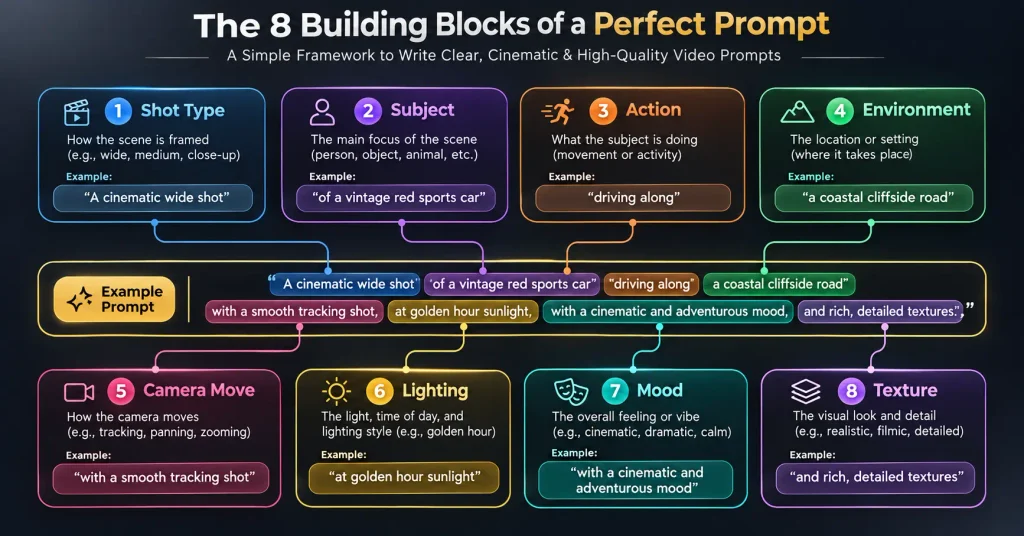
Mastering how to write AI video prompts becomes effortless when you follow a repeatable structure. Instead of staring at a blank text box, fill in these eight building blocks in order from most important to least important.
Step 1: Shot Type and Framing
Start by telling the model how close the camera is to your subject. Common framing choices include extreme close-up, close-up, medium shot, wide shot, and establishing aerial view. Placing the shot type first immediately locks in the composition before the model generates any details.
Step 2: Primary Subject Details
Describe the main person, animal, object, or product clearly using concrete visual traits. Include age, clothing texture, material finish, colors, and distinguishing features. Specificity here prevents the model from defaulting to generic faces or plain surfaces.
Step 3: Specific Action and Physics
State exactly what the subject is doing right now using active, present-tense verbs. Mention secondary physical reactions such as hair blowing in the wind, steam rising from a mug, or water splashing across stone. Physical cause-and-effect cues make AI motion look grounded and believable.
Step 4: Environment and Background Setting
Build the world surrounding your subject so the background feels rich rather than empty. Mention the location, architectural details, weather conditions, and subtle background activity like distant pedestrians or swaying trees.
Step 5: Camera Movement and Lens Choice
Direct the virtual camera operator with a single smooth motion. Effective moves include slow dolly push-in, smooth tracking shot, gentle orbit, upward crane tilt, or steady tripod lock-off. You can also add lens cues like 35mm wide lens, 85mm portrait lens, or shallow depth of field.
Step 6: Lighting and Color Palette
Lighting defines the emotional tone and realism of every video generation. Specify the light source and direction, such as warm golden hour sunlight streaming through blinds, moody neon reflections on wet asphalt, or soft diffused studio softbox lighting.
Step 7: Mood and Atmosphere
Add two or three descriptive words that unify the pacing and emotional feel of the shot. Examples include serene and nostalgic, tense and mysterious, energetic and commercial, or cozy and intimate.
Step 8: Technical Quality and Film Texture
Finish your prompt with subtle visual polish cues rather than spammy buzzwords. Useful tags include cinematic 4K film grain, natural skin textures, realistic motion blur, and crisp focus.
The Master Plug-and-Play Template:
[Shot Type] of [Detailed Subject] [Specific Action + Secondary Physics], set in [Environment/Background]. Camera performs a [Camera Movement] with [Lens/Depth of Field]. Illuminated by [Lighting & Color Palette], creating a [Mood/Atmosphere] feel, [Film/Quality Finish].
25 Before-and-After Examples
Seeing weak inputs transformed into structured descriptions is the fastest way to internalize how to write AI video prompts. Below are 25 original before-and-after examples across five popular categories that you can copy, paste, and customize right away.
Cinematic Storytelling and Portraits
Example 1: Rainy Window Reflection
- Before: A sad woman looking out a window in the rain.
- After: Medium close-up of a young woman in a chunky knit cream sweater resting her forehead gently against a rain-streaked glass window, watching blurred city traffic lights outside. Raindrops slowly slide down the pane in the foreground. Smooth slow dolly push-in on an 85mm lens with shallow depth of field. Cool blue twilight mixed with warm interior lamp glow, melancholic and quiet atmosphere, natural 35mm film grain.
Example 2: Elderly Craftsman
- Before: An old man working with wood in a shop.
- After: Medium shot of an elderly carpenter with silver hair and a worn canvas apron carefully hand-planing a walnut plank at a cluttered wooden workbench. Thin curls of wood shavings peel away and dust motes float through the air. Gentle tracking shot moving left to right at eye level. Warm afternoon sunbeams streaming through a dusty workshop window, nostalgic and authentic mood, crisp detail.
Example 3: Cyberpunk Street Walk
- Before: A futuristic girl walking in a neon city.
- After: Low-angle tracking shot following a woman in a reflective transparent rain jacket walking briskly down a crowded Tokyo alleyway at night. Glowing pink and cyan kanji neon signs reflect off wet puddles as steam rises from street vents. Smooth gimbal tracking shot matching her pace on a 35mm lens. Vibrant neon rim lighting against deep shadows, energetic and futuristic mood, cinematic anamorphic flare.
Example 4: Desert Explorer
- Before: A man walking in the desert at sunset.
- After: Wide establishing shot of a lone traveler wrapped in a linen scarf walking along the sharp ridge of a massive golden sand dune. Fine grains of sand blow gently off the dune crest in the evening breeze. Slow aerial drone pull-back revealing the vast desert horizon. Rich amber sunset light casting long dramatic shadows, epic and serene atmosphere, 4K cinema quality.
Example 5: Jazz Musician
- Before: Someone playing saxophone on stage.
- After: Close-up of a jazz saxophonist with eyes closed, brass keys gleaming as his fingers move rapidly during a soulful solo in a dimly lit underground club. Subtle stage haze swirls behind him. Slow 180-degree orbital camera movement around the brass horn. Warm tungsten spotlight creating golden highlights on the metal, intimate and rhythmic mood, shallow depth of field.
Commercial Product Ads
Example 6: Luxury Perfume Splash
- Before: A perfume bottle with water splashing.
- After: Macro slow-motion shot of a sleek glass perfume bottle resting on a dark wet slate pedestal as a crystal-clear wave of water splashes cleanly behind it. Tiny water droplets suspend mid-air and catch the light. Subtle upward camera tilt from low angle. Crisp studio rim lighting with soft golden reflections passing through the amber liquid, luxurious and refreshing mood, ultra-sharp commercial look.
Example 7: Pour-Over Coffee
- Before: Making coffee in the morning.
- After: Close-up overhead angled shot of hot water pouring in a steady spiral from a matte black gooseneck kettle into a ceramic pour-over dripper filled with freshly ground coffee. Rich crema bubbles up and delicate wisps of steam rise into the air. Slow push-in camera movement on a macro lens. Bright morning sunlight casting soft window shadows across a marble kitchen counter, warm and inviting mood, realistic liquid physics.
Example 8: Matte Skincare Jar
- Before: Skincare cream jar on a stone.
- After: Medium close-up of a frosted sage-green glass moisturizer jar placed on a smooth travertine stone block beside fresh eucalyptus leaves. A gentle breeze rustles the leaves while dappled sunlight shifts slowly across the label. Smooth horizontal slider movement from left to right. Soft diffused natural daylight, clean and organic wellness aesthetic, shallow depth of field.
Example 9: Wireless Headphones
- Before: Cool headphones floating in the air.
- After: Studio product shot of matte black over-ear wireless headphones rotating smoothly in zero gravity against a deep charcoal background. Subtle brushed aluminum hinges catch thin streaks of light as the earcups turn toward the lens. Controlled 360-degree camera orbit. Dramatic high-contrast edge lighting with cool blue accents, sleek and modern tech commercial mood, crisp 4K focus.
Example 10: Artisan Chocolate Bar
- Before: Breaking a piece of chocolate.
- After: Extreme close-up slow-motion shot of two hands snapping a thick dark chocolate bar studded with roasted hazelnuts in half. Fine cocoa crumbs fall gracefully onto a dark linen cloth below. Locked-off tripod shot with razor-sharp focus on the snap point. Warm directional side lighting highlighting the glossy chocolate texture, decadent and rich atmosphere.
Nature, Travel, and Landscapes
Example 11: Misty Mountain Lake
- Before: A lake in the mountains in the morning.
- After: Wide aerial drone shot gliding smoothly over a mirror-still alpine lake surrounded by pine-covered mountain peaks at dawn. Layers of low white mist drift slowly across the water surface. Forward drone flight tilting gently upward toward the horizon. Soft pastel pink and gold sunrise light illuminating the snow-dusted summits, peaceful and breathtaking mood.
Example 12: Autumn Forest Stream
- Before: A river in a forest with fall leaves.
- After: Low-angle wide shot of crystal-clear water rushing over mossy river stones in an autumn forest. Bright orange and golden maple leaves float downstream and drift down from overhead branches. Slow forward dolly movement inches above the water surface. Dappled golden sunlight filtering through the forest canopy, tranquil and crisp nature documentary style.
Example 13: Coastal Cliff Waves
- Before: Ocean waves hitting rocks.
- After: Dramatic aerial top-down view of deep turquoise ocean waves crashing into white sea foam against rugged black volcanic cliffs. Spray rises into the coastal wind before receding back into the tide. Slow vertical crane ascent revealing more of the jagged coastline. Overcast moody coastal daylight with rich natural contrast, powerful and raw atmosphere.
Example 14: Kyoto Bamboo Grove
- Before: Walking in a bamboo forest.
- After: Point-of-view medium wide shot moving smoothly down a quiet stone pathway lined with towering green bamboo stalks in Kyoto. Tall bamboo trunks sway gently in a light breeze, causing sunbeams to flicker across the ground. Steady Steadicam forward walk looking slightly upward. Soft emerald-filtered morning light, meditative and serene mood, natural color grading.
Example 15: Northern Lights Cabin
- Before: A cabin under the northern lights.
- After: Wide static tripod shot of a cozy timber A-frame cabin covered in fresh snow, warm amber light glowing from its triangular windows. Vivid green and violet aurora borealis ribbons dance slowly across the starry night sky above. Locked-off camera frame with subtle starlight twinkle. Cool blue snow reflections balanced against warm interior window glow, magical and quiet winter night.
Faceless Social Media and Aesthetic Clips
Example 16: Cozy Rainy Desk Study
- Before: Studying at a desk with rain outside.
- After: Over-the-shoulder medium shot of a neat wooden study desk with an open journal, a fountain pen, and a steaming ceramic mug beside a window overlooking a rainy garden. Raindrops patter against the glass while a small brass desk lamp casts a warm pool of light. Subtle slow zoom-in toward the open notebook. Warm amber desk lamp light contrasted with cool grey rainy daylight, cozy and focused aesthetic.
Example 17: Morning Bakery Croissants
- Before: Fresh croissants on a tray.
- After: Close-up angled shot of a baker’s hands dusting powdered sugar through a fine mesh sieve onto a tray of golden, flaky butter croissants fresh from the oven. Fine sugar particles float softly through the air and settle on the warm pastry crusts. Slow diagonal camera pan across the baking tray. Soft morning bakery window light, appetizing and comforting mood, shallow depth of field.
Example 18: Vintage Vinyl Record
- Before: A record player spinning.
- After: Close-up shot of a glossy black vinyl record spinning smoothly on a walnut turntable as the silver tonearm needle rests gently in the groove. Soft dust particles catch the light in the background. Slow low-angle lateral slide past the spinning edge. Warm sunset light streaming across a mid-century living room, nostalgic and relaxed lofi aesthetic.
Example 19: City Rooftop Sunset
- Before: Watching the sunset from a roof.
- After: Wide silhouette shot from a city rooftop terrace overlooking a sprawling skyline as the sun dips below distant skyscrapers. String lights overhead sway lightly in the evening breeze while tiny car headlights begin glowing on the streets below. Gentle pan from left to right across the horizon. Deep orange, purple, and magenta twilight sky, reflective and inspiring mood.
Example 20: Minimalist Pottery Wheel
- Before: Someone making a clay pot.
- After: Tight close-up of clay-covered hands shaping a smooth terracotta vase spinning steadily on a potter’s wheel. Water glistens on the wet clay surface as the walls rise evenly between the potter’s fingers. Steady tripod shot with soft background blur. Natural north-facing studio window light, calming and tactile ASMR aesthetic.
Sci-Fi, Fantasy, and Motion Graphics
Example 21: Ancient Library Discovery
- Before: A magical library with floating books.
- After: Wide upward-tilting shot inside a grand circular stone library with towering oak bookshelves stretching into shadow. Several leather-bound books hover gently in mid-air, pages fluttering softly as golden dust motes swirl around them. Slow crane rise through the center of the hall. Volumetric shafts of golden light piercing down from a high stained-glass dome, wondrous and mysterious fantasy mood.
Example 22: Bioluminescent Jungle
- Before: Glowing plants in a dark forest.
- After: Medium tracking shot gliding through an alien jungle at night filled with translucent blue and violet bioluminescent ferns and giant glowing mushrooms. Tiny luminous spores drift lazily upward through the humid air. Smooth floating camera push-in along a winding mossy trail. Soft self-illuminated cyan and magenta plant glow against deep indigo shadows, ethereal sci-fi atmosphere.
Example 23: Orbital Space Station
- Before: A spaceship flying near Earth.
- After: Cinematic wide shot of a sleek white modular space station orbiting slowly above the curved blue horizon of Earth. Thin white cloud swirls and city lights along the night terminator line pass silently below. Slow tracking camera drift alongside the solar arrays. Harsh bright directional sunlight on the hull contrasted with deep pitch-black space, realistic sci-fi film aesthetic.
Example 24: Clockwork Mechanical Heart
- Before: Gears turning inside a machine.
- After: Extreme macro shot of intricate brass and copper clockwork gears interlocking and rotating smoothly inside an open antique pocket watch. Tiny ruby bearings gleam as the balance wheel oscillates rapidly. Smooth slow push-in toward the center gear. Warm dramatic spotlighting with rich metallic reflections, precise and steampunk aesthetic.
Example 25: Neon Liquid Abstract
- Before: Colorful liquid moving around.
- After: Macro abstract shot of glossy metallic gold and deep emerald liquid ink swirling and colliding in slow motion inside clear water. Ribbons of fluid curl into organic silk-like waves without mixing. Gentle rotational camera roll. High-contrast studio backlighting creating luminous translucent edges, sleek and hypnotic modern visual.
If you want hundreds more structured templates across storytelling, ads, and social clips, you can browse our 500 Customisable AI Video Prompts pack to build entire video sequences in minutes.
Story-to-Video vs Image-to-Video Prompts
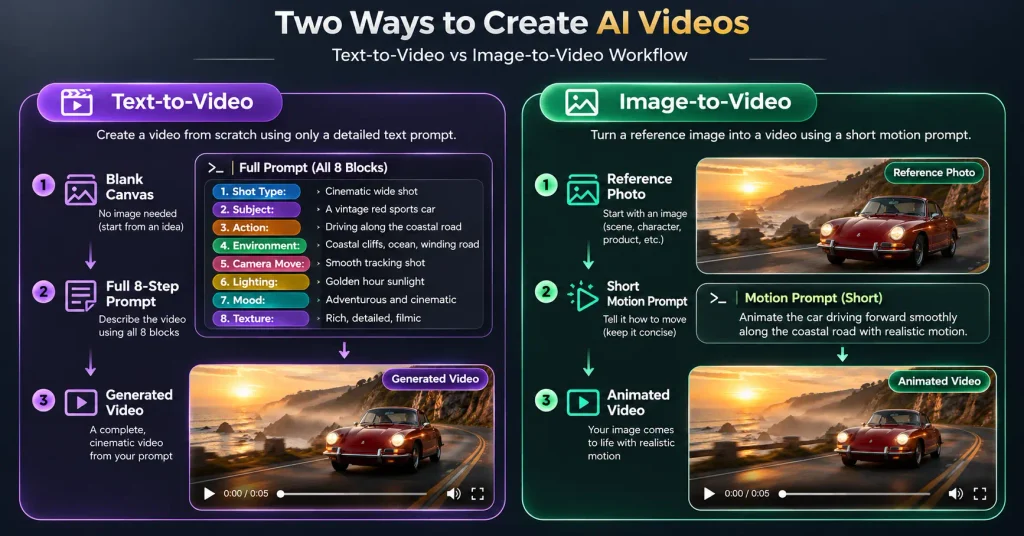
One of the biggest mistakes creators make when learning how to write AI video prompts is using the exact same writing style for both text-to-video and image-to-video workflows. Because these two modes start from completely different inputs, your prompt structure must change to match.
In a story-to-video (text-to-video) workflow, the generator starts from a blank canvas. You must describe everything: the subject’s appearance, clothing, background environment, lighting, camera move, and action. If you leave out the background or lighting, the model has nothing to reference and will invent random scenery.
In an image-to-video workflow, you upload an existing photo or AI-generated still frame first, as covered in our image to video AI guide. Because the model can already see the subject, colors, lighting, and background in your uploaded image, repeating long visual descriptions often confuses the AI or causes it to morph the original photo unnecessarily.
Instead, image-to-video prompts should focus almost entirely on motion, physics, and camera movement:
- What to remove in image-to-video: Remove long descriptions of hair color, outfit details, furniture colors, and lighting setups that are already visible in your reference picture.
- What to keep in image-to-video: State clearly which part of the image moves, how fast it moves, what secondary elements react (wind, steam, reflections), and how the camera travels.
For example, if you upload a finished photo of a woman holding a coffee cup in a cafe, a strong image-to-video prompt is simply: “The woman smiles softly and lifts the ceramic mug toward her lips while steam rises gently from the coffee. People in the background walk softly out of focus. Slow dolly push-in camera movement, natural subtle motion.” Short, motion-focused instructions keep your original image locked in without warping faces or logos.
One-Line Prompts vs Detailed Prompts
You do not always need an eighty-word paragraph to get great results. Knowing how to write AI video prompts also means knowing when a short, punchy line works better than a long cinematic breakdown.
| Feature | One-Line Prompts (10 to 20 Words) | Detailed Formula Prompts (45 to 75 Words) |
| Best Use Cases | Fast brainstorming, abstract backgrounds, simple nature loops, quick social B-roll | Client commercials, narrative scenes, specific camera choreography, product ads |
| Creative Control | Low to medium; the AI chooses lighting, framing, and mood automatically | High; you control lens choice, lighting direction, motion speed, and atmosphere |
| Risk of Artifacts | Low, because fewer instructions mean fewer conflicting visual cues | Moderate if poorly written, but very low when structured in logical order |
| Generation Speed | Fast to write and easy to iterate across multiple random seeds | Takes 30 seconds longer to write, but saves credits by nailing the shot faster |
When to Use a One-Line Prompt
Use a concise one-line prompt when you want the AI model to surprise you or when a scene only involves one simple ambient motion. Examples include “Slow drone shot flying over misty pine mountains at sunrise, cinematic 4K” or “Close-up of ocean waves washing gently over wet sand at golden hour.” Models like Google Flow, which we break down in our [suspicious link removed], handle clean single-subject prompts remarkably well when you want fast creative exploration.
When to Use a Detailed Prompt
Switch to the full 8-step formula whenever you are creating scenes that must match a specific visual storyboard, brand aesthetic, or commercial shot list. According to the Runway prompting guide, organizing prompts clearly around subject motion, scene context, and camera direction consistently produces more predictable and coherent video clips. If you are generating clips for Google Veo prompts or client campaigns, detailed prompts prevent the model from guessing wrong.
How to Troubleshoot Over-Prompting
If a detailed prompt produces stiff motion or ignores your camera move, follow this quick three-step trim:
- Cut duplicate adjectives: Remove repetitive words like “ultra-realistic, hyper-detailed, 8K, masterpiece, award-winning.”
- Simplify to one action: If the subject is doing two things at once, delete the second action so the clip focuses on one smooth movement.
- Move the camera cue earlier: Place the camera movement right after the shot type so the model prioritizes camera motion before rendering background details.
Get 500 Customisable Templates
Learning how to write AI video prompts from scratch is a superpower, but building complex shot lists from a blank page every day takes hours of creative energy. When you are trying to publish daily social clips, build faceless channels, or deliver client commercial concepts on a tight deadline, starting with proven templates saves massive amounts of time and generation credits.
The 500 Customisable AI Video Prompts bundle was built specifically for creators, filmmakers, and marketers who want reliable, repeatable results across modern AI video tools. Inside the pack, you get structured story-to-video prompts, image-to-video motion templates, character consistency workflows, and camera choreography guides that you can copy, tweak, and render in seconds.
If you are building vertical social channels, you can also pair your workflow with our Faceless Reels Prompts for ready-made hooks and overlays, or check out the Image-to-Video Guide + 500 Prompts to master animating still photos with realistic camera moves.
Unlock 500 Customisable AI Video Prompts Today Stop guessing which words trigger smooth motion and cinematic lighting. Download 500 ready-to-customize story-to-video and image-to-video prompt templates with character consistency workflows.
Final Thoughts on How to Write AI Video Prompts
Once you know how to write AI video prompts using a clear, logical sequence, AI video generation stops feeling like a slot machine and starts feeling like directing a virtual camera crew. Start with your shot type, define your subject and single physical action, anchor the environment, and guide the lens with purposeful lighting and camera movement. Practice with the 25 before-and-after examples above, refine your favorite templates, and grab the 500 Customisable AI Video Prompts bundle whenever you are ready to scale your video production.
4. Frequently Asked Questions
What is the best formula for how to write AI video prompts? The most reliable formula follows an 8-step order: shot type, detailed subject, specific physical action, background environment, camera movement, lighting and color palette, overall mood, and film texture. Keeping descriptions in this sequence helps AI video models lock in framing and motion without distortion.
How long should an AI video prompt be? A strong text-to-video prompt typically works best between 40 and 75 words, which is enough room to specify subject action, lighting, and camera movement without confusing the model. For image-to-video prompts where the visuals already exist in your uploaded photo, 15 to 30 words focused purely on motion and camera movement is ideal.
How do I control camera movement in AI video prompts? Include one clear filmmaking camera term such as slow dolly push-in, smooth lateral tracking shot, 180-degree orbit, upward crane tilt, or locked-off tripod shot. Avoid combining multiple complex camera moves in a single five-second clip, as conflicting directions often cause unnatural warping.
Why do characters morph or distort in AI generated videos? Morphing usually happens when a prompt asks for too many rapid actions at once, lacks clear lighting and environment details, or mixes conflicting visual styles. Limiting each clip to one simple action and using concrete, realistic descriptions keeps subjects consistent from the first frame to the last.
Should I write different prompts for image-to-video and text-to-video? Yes. Text-to-video prompts must describe the entire scene from scratch, including clothing, setting, and lighting. Image-to-video prompts should skip describing details already visible in your reference photo and focus strictly on what moves, how physics react, and how the camera travels.