Email: info@nocodepakistan,com

Deciding what to include in a portfolio website can feel overwhelming when you are staring at a blank screen and trying to impress high-paying clients. Many freelancers, designers, and developers spend weeks agonizing over fonts and animations while leaving out the exact information buyers need to hire them.
Table of Contents
A great portfolio is not an online art gallery or a digital resume dump. It is a focused sales tool designed to prove your expertise, build immediate trust, and make hiring you the easiest decision a client makes all week.
Skip the Blank Page Syndrome Stop guessing what clients want to read on your site and launch faster with done-for-you copy frameworks. Get the Portfolio Website Prompts bundle on Etsy
What a Portfolio Website Must Do
Before you write a single headline, you need to understand the job your site is hired to do. Busy founders, recruiters, and marketing directors spend less than fifteen seconds scanning a new tab before deciding whether to stay or hit the back button.
Your site has three core duties. First, it must clearly state who you help and what problem you solve within three seconds of landing. Second, it needs to back up your claims with real proof, such as visual work, measurable outcomes, and client praise.
Third, your site must guide visitors toward a single, low-friction next step. If you are just starting out and figuring out [suspicious link removed] or anywhere else in the world, getting these fundamentals right puts you ahead of ninety percent of your competition.
12 Sections to Include in a Portfolio Website
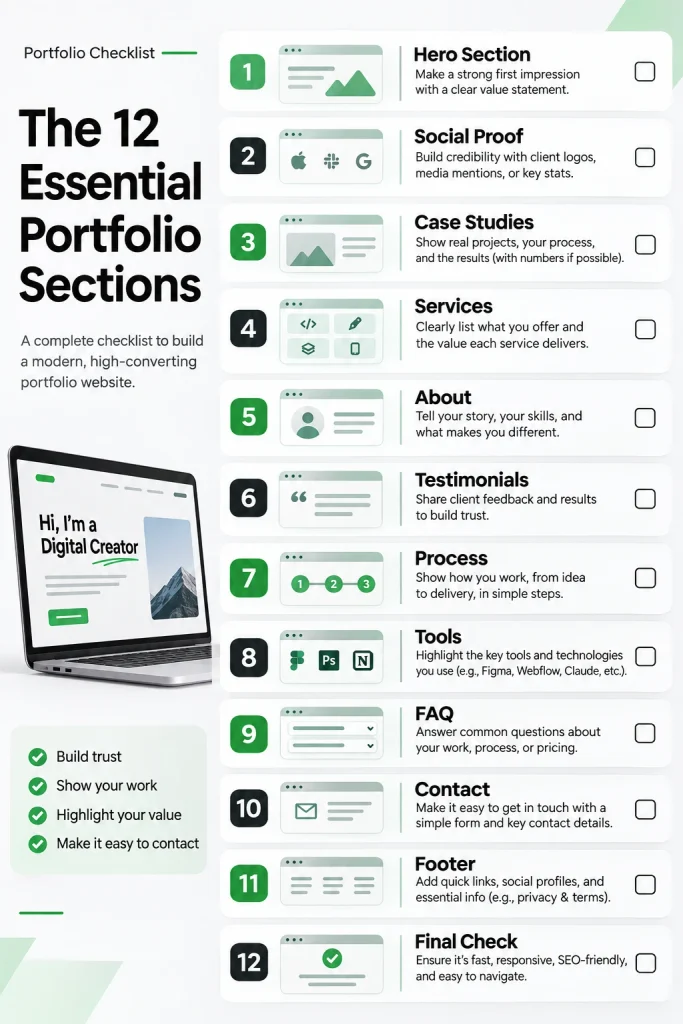
Knowing what to include in a portfolio website comes down to organizing your pages so visitors never feel lost. Whether you build a single-page scrolling site or a multi-page web app, make sure these twelve building blocks are present.
1. A Benefit-Driven Hero Section
Your hero section sits at the very top of your homepage and carries the heaviest load. Skip vague greetings like “Welcome to my corner of the internet” or clever taglines that confuse visitors.
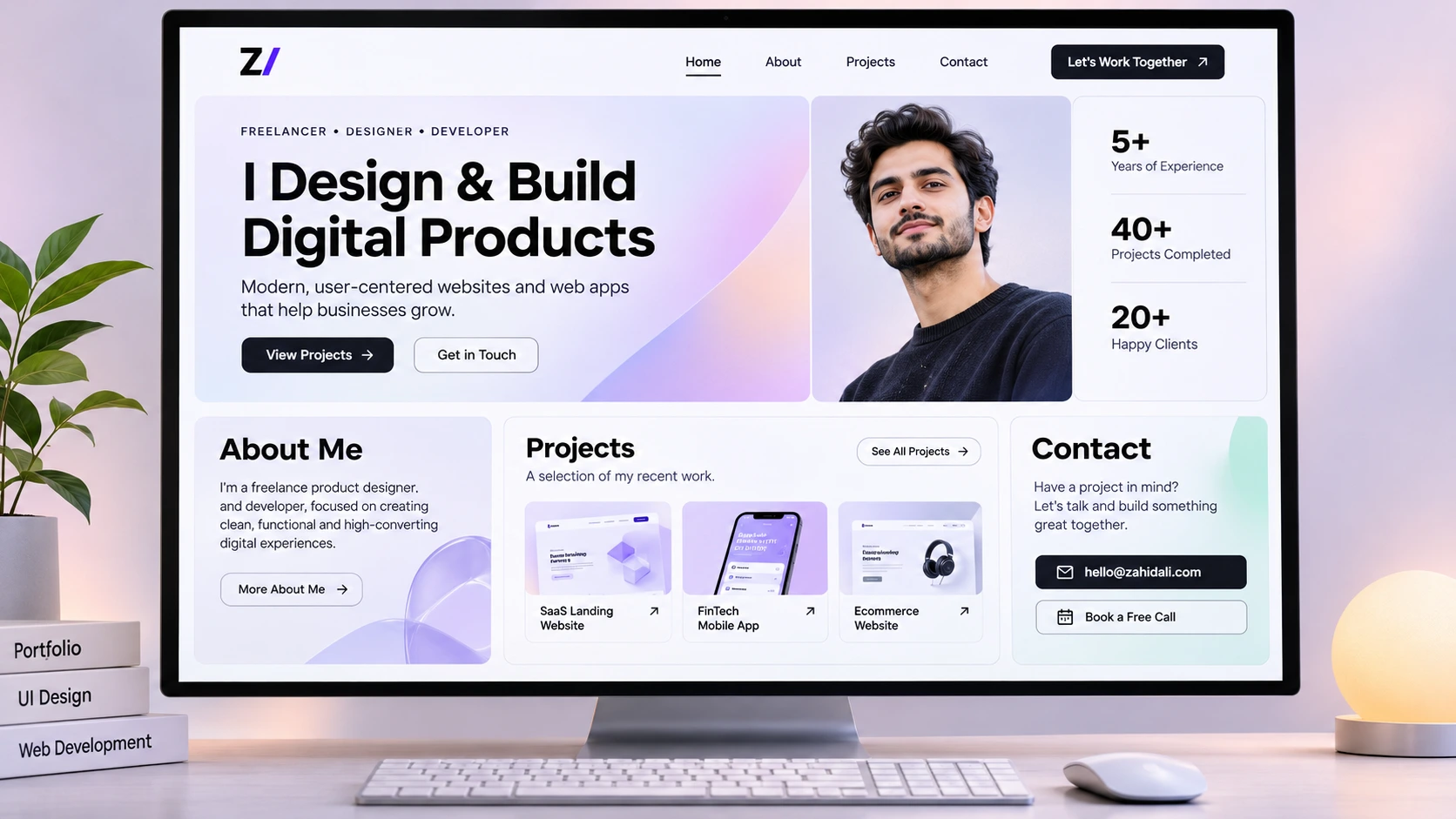
Instead, combine a clear value proposition headline, a two-sentence subheadline explaining your niche, a primary call-to-action button, and a clean visual of your best work or your face.
2. Social Proof and Client Logos
Trust starts before anyone reads your case studies. Place a clean horizontal strip of client logos, platform badges, or key metrics right beneath your hero fold.
If you have not worked with household brands yet, highlight industries you have served, projects completed, or five-star ratings from freelance marketplaces.
3. Curated Selected Work Grid
Resist the urge to upload every project you have ever touched since college. Display three to six of your strongest, most relevant pieces that represent the exact type of work you want to attract more of.
Each project card should feature a crisp thumbnail, the client or project name, a short outcome-focused title, and tags showing your specific role.
4. Detailed Project Case Studies
Pretty screenshots alone rarely close high-ticket contracts. Clicking on any project card should open a dedicated breakdown explaining the business problem, your creative or technical process, and the final result.
5. Clear Services and Packages
Clients hate guessing whether you offer what they need. Create a dedicated section outlining your core services in plain language, focusing on business deliverables rather than technical jargon.
Grouping your offerings into clear tiers or sprint packages also helps pre-qualify leads before they ever hop on a discovery call.
6. A Client-Focused About Section
Visitors click on your About page to answer one question: “Is this person reliable and easy to work with?” Balance your professional background with a brief story about why you love your craft and how you approach collaboration.
Include a warm, well-lit headshot so potential clients can put a real human face to your name.
7. Specific Testimonials With Context
Generic praise like “Great job, very fast!” does very little to persuade skeptical buyers. Feature two to four detailed testimonials that mention the specific challenge you solved and the impact on the client’s business.
Always include the client’s full name, job title, company name, and photo whenever possible to maximize credibility.
8. Your Step-by-Step Work Process
Uncertainty is the biggest reason leads hesitate to reach out. Adding a simple three-to-four-step timeline (such as Discovery, Strategy, Execution, and Launch) removes fear and shows that you run an organized business.
9. Tech Stack and Core Tools
Listing the software, frameworks, and platforms you master helps both human clients and search engines understand your capabilities. Group your tools logically, such as Design, Development, Automation, and Analytics.
10. Frequently Asked Questions
An on-page FAQ section handles common objections before they stall a deal. Answer practical questions about your typical timelines, revision policies, communication style, and starting budgets.
11. Friction-Free Contact Section
Make reaching out effortless by placing a simple contact form on your dedicated Contact page and at the bottom of key landing pages. Keep fields to a minimum: Name, Email, Project Type, and a brief message box.
Always list a direct clickable email address alongside your form for clients who prefer using their own inbox.
12. Clean Footer Navigation
Your footer acts as a safety net for visitors who scroll all the way down. Repeat your primary navigation links, include active social profiles like LinkedIn or GitHub, display your location or time zone, and add a clear copyright notice.
Writing a Project Case Study
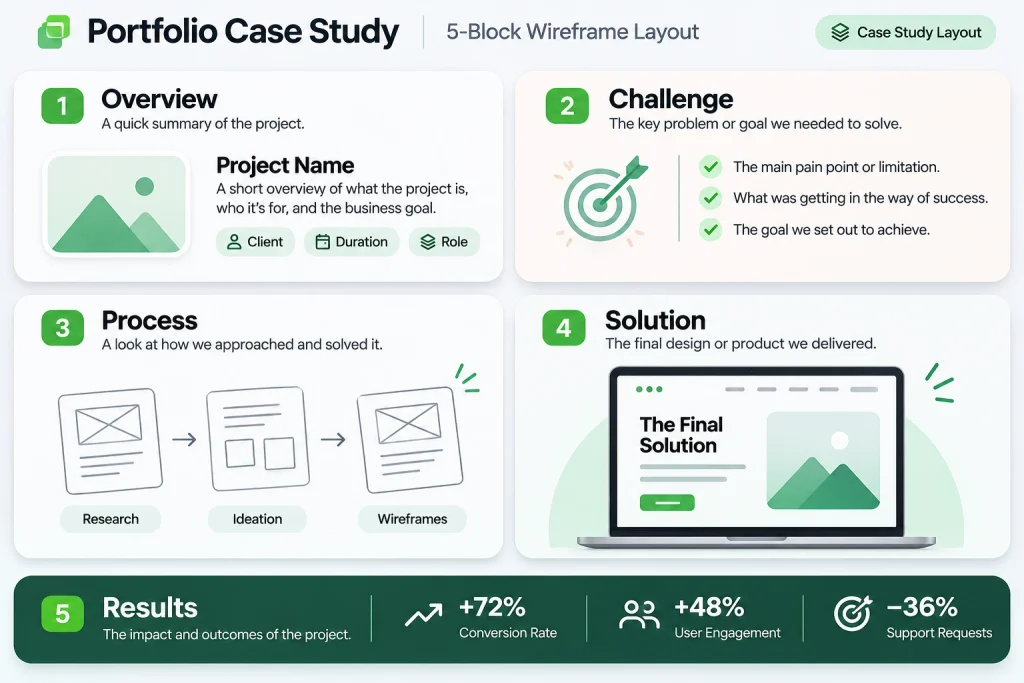
When planning what to include in a portfolio website, your case studies are the true deal-closers. Serious clients care far more about how you think and solve problems than they do about surface-level aesthetics.
Follow this simple five-part structure for every project you showcase:
- The Overview: Summarize the client, their industry, your role, the timeline, and the core tools used in three quick bullet points.
- The Challenge: Describe the specific pain point the client faced before hiring you, such as low conversion rates, slow page speeds, or an outdated brand identity.
- The Strategy and Process: Walk the reader through your research, wireframes, prototypes, or technical architecture, highlighting key decisions you made along the way.
- The Solution: Showcase high-resolution visuals, interactive embeds, or live links of the finished product with brief captions explaining why each feature exists.
- The Results: Share concrete numbers whenever possible, such as a percentage lift in signups, faster load times, or hours saved per week through automation.
If you are under a strict non-disclosure agreement or building spec projects to break into a new niche, focus deeply on your problem-solving logic and design rationale.
About Page Formula
Your About page is often the second most visited page on your entire domain, yet it is usually the hardest page to write for yourself. Knowing what to include in a portfolio website About section becomes much easier when you follow a proven narrative arc.
Start with a strong opening hook that connects your background directly to the results you deliver for clients today. Avoid opening with your birth city or a chronological list of every job you held ten years ago.
Next, share your core working philosophy in two short paragraphs. Explain what separates your approach from agencies or cut-rate freelancers, whether that is obsessive attention to user experience, clean code, or fast communication.
Follow this with a scannable proof block highlighting certifications, notable industries, or key milestones. Close the page with a subtle personal touch, like a hobby or local interest, followed immediately by a clear call to action inviting visitors to view your work or book a call.
When you are ready to turn your portfolio visitors into active freelance leads, having strong systems for outreach and client management matters just as much as your website copy. You can streamline your client onboarding, proposals, and pricing structure with the Freelance Business Guide & Workbook.
Portfolio SEO Basics
Even the best-designed site will struggle to bring inbound leads if nobody can find it on Google. Paying attention to what to include in a portfolio website from a search engine perspective ensures your name and niche show up when clients search for specialists.
First, optimize your homepage title tag and H1 heading with your primary service and niche, such as “Webflow Developer & UI/UX Designer for SaaS Brands.” Search engines rely heavily on these signals to categorize your site, as outlined in the official Google Search Central SEO Starter Guide.
Second, write unique meta descriptions and clean URL slugs for every individual case study and service page. Avoid generic slugs like /project-1 and use descriptive URLs like /ecommerce-redesign-case-study instead.
Third, compress all portfolio screenshots to WebP format and add descriptive alt text to every image. Fast load times keep mobile visitors engaged and protect your search rankings.
Finally, include a clear text link to your LinkedIn profile, GitHub, or Behance account to establish brand entity signals across the web.
15 AI Prompts to Write Each Page
Staring at a cursor slows down even experienced creators. Use these 15 ready-to-copy prompts with ChatGPT, Claude, or Gemini to draft crisp, persuasive copy for every part of your site.
Simply bracket-fill your specific details before running each prompt.
Homepage Prompts
1. Value Proposition Hero Headline
Act as a conversion copywriter. Write 5 clear, benefit-driven hero headlines and 2-sentence subheadlines for my portfolio website. My role is [insert role], my target clients are [insert industry/audience], and the main result I help them achieve is [insert outcome]. Avoid buzzwords and clichés.
2. Credibility & Metrics Strip
Turn these raw career facts into a crisp, high-trust 4-column metrics strip for my homepage: [insert years of experience, number of projects, client industries, and top skills]. Keep each item under 6 words.
3. Homepage Services Snapshot
Write 3 scannable service cards for my portfolio homepage based on these offerings: [list 3 core services]. For each card, provide a punchy 3-word title, a 2-sentence description focused on client ROI, and a short action-oriented link text.
About Page Prompts
4. Client-Focused About Opening
Write an engaging 2-paragraph opening for my portfolio About page. Connect my background in [insert background/skills] directly to helping [insert target client] solve [insert core problem]. Keep the tone confident, warm, and conversational.
5. Working Philosophy Section
Draft a “How I Work” section for my About page based on these 3 core values: [insert 3 values, e.g., clear communication, fast iteration, clean architecture]. Explain how each value benefits the client during a project.
6. Short Bio for Guest Features & Footers
Write three versions of my professional bio: a 25-word micro-bio for my website footer, a 60-word bio for LinkedIn, and a 120-word bio for my About page. Base them on these facts: [insert key achievements and role].
Case Study Prompts
7. Case Study Outline Generator
Organize these rough project notes into a structured 5-part case study (Overview, Challenge, Process, Solution, Results): [paste raw project notes, client goals, and outcomes]. Keep paragraphs under 3 sentences.
8. Problem-to-Solution Summary Hook
Write a compelling 3-sentence introduction for a portfolio case study about [insert project name]. Highlight the initial business problem of [insert problem] and tease the final outcome of [insert result] without giving everything away.
9. Image Caption Writer
Write 5 informative captions for screenshots in my [insert project type] case study. Each caption should explain what the user is seeing and why that specific design or technical decision improved the user experience.
Services & FAQ Prompts
10. Productized Service Package Description
Turn my custom service of [insert service] into a clear, fixed-scope package description for my portfolio. Include a catchy package name, who it is best for, 5 bulleted deliverables, estimated timeline, and a clear call to action.
11. Objection-Handling FAQ Generator
Generate 6 practical FAQ questions and reassuring, honest answers for a freelance [insert your profession] portfolio website. Address pricing structure, timelines, revisions, communication tools, and ownership rights.
12. Work Process Timeline
Write a 4-step “What Happens After You Reach Out” timeline for my services page. Make each step reassuring, specific, and under 35 words so hesitant leads feel comfortable booking a call.
Contact & SEO Prompts
13. High-Converting Contact Page Intro
Write a welcoming 3-sentence intro for my portfolio Contact page that encourages serious leads to fill out the form. Mention my typical response time of [insert response time] and list 3 types of projects I am currently booking.
14. Portfolio SEO Meta Tags
Write an SEO title tag (under 60 characters) and meta description (140 to 155 characters) for my portfolio homepage. Target the keyword “[insert target keyword]” while highlighting my specialty in [insert niche].
15. Testimonial Polishing Prompt
Edit this raw client message into a punchy, credible 3-sentence website testimonial without changing the client’s core meaning or inventing facts: [paste raw client feedback]. Suggest a bold 5-word pull-quote headline to sit above it.
These 15 prompts give you a strong starting point for drafting your core pages fast. If you want complete prompt libraries covering every page variation, niche angle, micro-copy element, and SEO checklist, the full bundle includes over 150 specialized prompts ready to plug into your workflow.
Get 150 Portfolio Prompts
Building a client-winning website takes far less time when you have proven templates guiding every section. Knowing what to include in a portfolio website is only half the battle; writing clear, persuasive copy that sets you apart from crowded marketplaces is what actually fills your calendar.
Launch Your Portfolio Website This Weekend Save hours of writer’s block with 150+ tailored AI prompts for Home, About, Case Studies, Services, Contact, and SEO pages.
- Get the Portfolio Website Prompts bundle on Etsy
- Explore more creator and freelancer toolkits at Aesthentica Studio on Etsy
Frequently Asked Questions
How many projects should I include in my portfolio website? Aim for three to six of your best, most relevant projects rather than uploading everything you have ever made. Curating a tight selection keeps visitors focused on your highest-quality work and positions you as a specialist instead of a generalist.
What should I put on my portfolio website if I have no client work yet? Include two or three self-initiated projects, redesigns of well-known apps, or volunteer builds for local businesses. Treat each piece like a real client engagement by documenting the problem you solved, your creative process, and your final results.
Should I include pricing on my portfolio website? Listing starting prices or ballpark package ranges helps filter out leads who cannot afford your rates while building trust with serious buyers. If your projects are strictly custom, state a clear minimum engagement threshold on your Services or Contact page.
Is a one-page portfolio website better than a multi-page site? A one-page site works great if you offer one core service and have three or four quick visual examples. Choose a multi-page layout once you have detailed project case studies, multiple service tiers, or blog articles that need dedicated URLs to rank in Google.
How often should I update the content on my portfolio website? Review and refresh your portfolio every three to six months by retiring older pieces and adding your newest case studies. Regular updates ensure your site accurately reflects your current skill level, rates, and ideal client profile.
Conclusion
Mastering what to include in a portfolio website removes the guesswork from pitching yourself online. By combining a clear hero value proposition, detailed case studies, real social proof, and an easy contact path, you turn casual browsers into qualified leads who are ready to hire you.
Frequently Asked Questions
Q1: How many projects should I include in my portfolio website?
Aim for three to six of your best, most relevant projects rather than uploading everything you have ever made. Curating a tight selection keeps visitors focused on your highest-quality work and positions you as a specialist instead of a generalist.
Q2: What should I put on my portfolio website if I have no client work yet?
Include two or three self-initiated projects, redesigns of well-known apps, or volunteer builds for local businesses. Treat each piece like a real client engagement by documenting the problem you solved, your creative process, and your final results.
Q3: Should I include pricing on my portfolio website?
Listing starting prices or ballpark package ranges helps filter out leads who cannot afford your rates while building trust with serious buyers. If your projects are strictly custom, state a clear minimum engagement threshold on your Services or Contact page.
Q4: Is a one-page portfolio website better than a multi-page site?
A one-page site works great if you offer one core service and have three or four quick visual examples. Choose a multi-page layout once you have detailed project case studies, multiple service tiers, or blog articles that need dedicated URLs to rank in Google.
Q5: How often should I update the content on my portfolio website?
Review and refresh your portfolio every three to six months by retiring older pieces and adding your newest case studies. Regular updates ensure your site accurately reflects your current skill level, rates, and ideal client profile.
Q6: Is NoCode Pakistan Provide portfolio website development services?
Yes, we provide all types and industry specific website development services, check our services.